
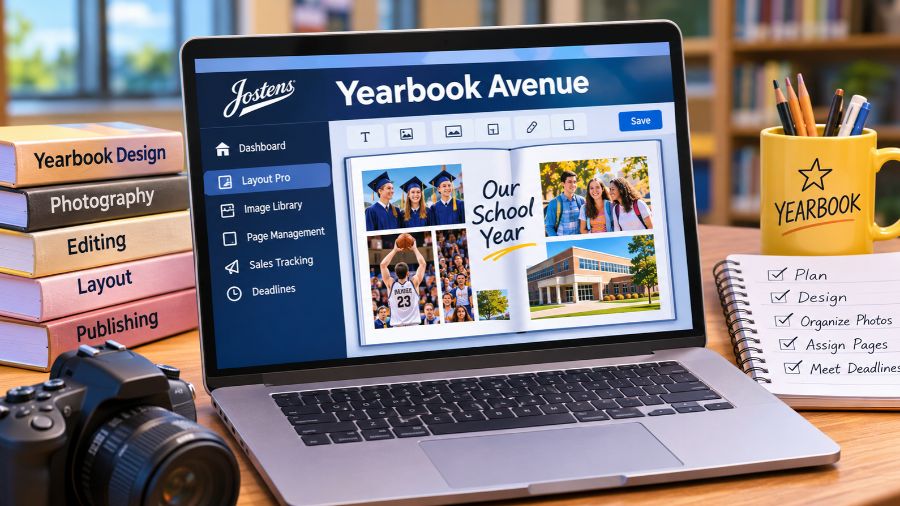
What Is Yearbook Avenue?
Yearbook Avenue is a web-based yearbook management and production platform operated by Jostens, a company known for providing school yearbooks, graduation products, and related educational services. It is designed to support the complete yearbook development process, bringing planning resources, creative tools, staff coordination, sales information, and production management together. Rather than relying on separate applications and disconnected files, schools can use the platform to coordinate many important activities associated with publishing a yearbook. Its primary audience includes yearbook advisers, student staff members, editors, photographers, and school organizations that work with Jostens. The platform also provides access to educational resources that help students develop practical skills in photography, writing, editing, and publication design.
How Does Yearbook Avenue Work?
Yearbook Avenue operates as a centralized online workspace where authorized school yearbook teams can manage different stages of publication production. After signing in, users can access the tools and resources available to their school, depending on their assigned permissions and yearbook program. Advisers can organize projects, distribute responsibilities, monitor production progress, and oversee important deadlines, while student staff members can contribute to assigned pages and creative tasks. The platform connects planning activities with page creation and production management, helping teams maintain a consistent workflow throughout the academic year. Its online structure also makes it possible for authorized users to access their yearbook work through supported internet-connected devices without depending entirely on a single computer.
Understanding the Yearbook Avenue Dashboard
The dashboard serves as a central starting point for navigating the platform and reviewing important yearbook activities. Depending on the available account features, users can access information about upcoming events, assigned tasks, sales progress, image organization, and production deadlines. These details help advisers and editors understand which activities require attention and whether the yearbook project is progressing according to its schedule. Having relevant information in one location can reduce confusion, particularly when several students are responsible for different sections of a publication.
Understanding User Roles and Permissions
Different users may receive different access privileges according to their responsibilities. Advisers generally oversee the yearbook program and manage important administrative settings, while editors may coordinate assignments, templates, and page organization. Student staff members typically concentrate on the creative and editorial work assigned to them. This permission-based approach helps schools distribute responsibilities without giving every contributor unrestricted control over important production settings. It also allows advisers to maintain oversight while encouraging students to participate in the publication process.
Key Features of Yearbook Avenue
Yearbook Avenue offers several interconnected features designed to make yearbook production more organized and manageable. Its tools address common challenges faced by school publications, including collecting photographs, maintaining consistent page designs, assigning responsibilities, tracking student representation, and monitoring sales. Jostens presents the platform as a comprehensive yearbook management solution rather than simply an online graphic design application. The available capabilities can vary depending on the school’s program, selected design tools, and account permissions.
Layout Pro for Yearbook Design
Layout Pro is one of the central creative tools available through Yearbook Avenue. It allows authorized users to build yearbook pages using editing and layout features designed specifically for school publications. Users can place and crop photographs, edit text, add backgrounds, and incorporate clip art into their page designs. The interface also provides page navigation and design controls that help staff members work with individual pages and two-page spreads. Its purpose is to make page creation more accessible to students and advisers who may not have extensive experience with professional publishing software. Layout Pro helps teams produce organized layouts while maintaining visual consistency across different sections of the yearbook.
Image Library and Photo Organization
Photographs are among the most important elements of a school yearbook, but managing large collections of images can become difficult without a structured system. Yearbook Avenue provides image organization features that help staff members arrange photographs into relevant folders. These folders can correspond with page assignments, school events, sports activities, clubs, and other publication topics. Organizing images according to the yearbook’s page structure makes it easier for designers to locate relevant photographs when preparing layouts. It can also help reduce the time spent searching through unrelated files and improve coordination between photographers and editors.
Page Assignment and Project Management
Creating a yearbook involves multiple contributors working on different sections at the same time. Yearbook Avenue includes project management capabilities that allow advisers and editors to assign pages, monitor progress, and coordinate responsibilities. Page tracking makes it easier to identify completed work and recognize sections that still require attention. Advisers can use these tools to maintain an overview of the publication rather than manually checking every student’s progress. This approach is particularly useful for larger school programs where several teams may be responsible for sports, academics, student activities, portraits, and special events.
Student Coverage and Captioning Tools
Representing the wider school community is an important part of producing a meaningful yearbook. Jostens provides coverage-related features that help staff members understand whether students are appearing in the publication. Photo tagging and coverage information can support the identification of individuals and help editors review representation across pages. Captioning tools also assist with identifying people in photographs, reducing the likelihood of spelling mistakes when names are entered into captions. These features are valuable because accurate identification and balanced coverage contribute to a more inclusive and carefully edited publication.
Templates, Fonts, Colors, and Design Resources
Consistent visual presentation is essential when different students contribute to the same yearbook. Yearbook Avenue provides design resources that help teams establish a recognizable visual style. Depending on the available program, users can work with page templates, font collections, color palettes, backgrounds, and other creative elements. Templates provide a starting point for designing pages, while customizable styling options allow students to adapt layouts to the school’s theme. These resources can reduce repetitive formatting work and help maintain a professional appearance throughout the publication.
How to Log In to Yearbook Avenue
Accessing Yearbook Avenue requires an authorized account associated with a Jostens yearbook program. The login process generally involves visiting the official Yearbook Avenue portal and entering the relevant school year, job number, username, and password. These details connect the user to the correct yearbook project rather than providing unrestricted access to every school publication. New schools generally receive account information through Jostens, while existing advisers may continue using their established credentials. Students should obtain their login details from their yearbook adviser or school publication team instead of attempting to register independently without authorization.
Yearbook Avenue Login Requirements
Users generally need four pieces of information to access the traditional Yearbook Avenue login: the academic year associated with the publication, the school’s yearbook job number, a registered username, and the corresponding password. The job number is particularly important because it identifies the specific yearbook project. Entering incorrect information can prevent successful authentication or access to the intended publication. Users should check their school-provided login details carefully before attempting to sign in again.
What to Do If You Cannot Log In
Login problems can occur when users enter incorrect credentials, select the wrong school year, or attempt to access a project using outdated information. Students who have forgotten their login details should contact their yearbook adviser, who can help confirm the appropriate account information. Advisers experiencing access difficulties may need assistance from their Jostens representative or plant consultant. Users should also check their internet connection and browser before assuming that the platform itself is unavailable. Repeatedly trying random passwords is not a reliable way to resolve an account access problem.
Benefits of Using Yearbook Avenue for Schools
Yearbook Avenue offers practical benefits for educational institutions that want to manage publication activities through a coordinated digital system. Its combination of design, planning, image management, and progress tracking features can make collaboration easier for students and teachers. It also provides an opportunity for students to develop skills that extend beyond producing a printed publication. Working on a yearbook introduces practical experience in communication, visual storytelling, photography, editing, teamwork, and project organization. For advisers, centralized management tools can make it easier to supervise contributors, maintain production schedules, and identify areas requiring additional attention.
Better Collaboration Between Students and Teachers
Yearbook production often requires coordination between several individuals with different responsibilities. A photographer may collect images, an editor may review captions, and another student may prepare a page layout. A shared management environment helps connect these activities and makes responsibilities easier to coordinate. Advisers can maintain oversight while allowing students to take ownership of their assigned work. This structure encourages teamwork and gives students a clearer understanding of how collaborative publishing projects operate.
Improved Organization and Time Management
Deadlines are a major consideration in school yearbook production because pages must be completed, reviewed, and submitted according to the publication schedule. Yearbook Avenue’s planning and tracking features help teams monitor these responsibilities. Assigning pages and reviewing completion status can make production schedules easier to manage. Instead of relying entirely on informal reminders, advisers can use project information to identify unfinished assignments and organize follow-up activities.
Practical Learning Opportunities
Yearbook projects can introduce students to several useful professional skills. Through photography, writing, editing, and page design, students gain experience with different aspects of media production. They also learn how to work within deadlines, communicate with teammates, review mistakes, and prepare content for publication. These experiences can be particularly valuable for students interested in journalism, graphic design, photography, communications, marketing, and digital media.
Yearbook Avenue vs. Traditional Yearbook Design Software
Traditional yearbook production can involve multiple applications for image editing, document creation, communication, and project tracking. Yearbook Avenue takes a more integrated approach by bringing several publication-related activities into a centralized environment. Its Layout Pro tool provides yearbook-specific design capabilities, while the wider platform supports planning, image organization, staff management, and production tracking. However, it is important to distinguish between Yearbook Avenue and professional desktop publishing applications. Jostens also offers Monarch, a separate cloud-based design solution that provides access to Adobe InDesign, Photoshop, and Bridge. The choice between available design options depends on a school’s publication requirements, staff experience, and selected Jostens program.
Yearbook Avenue and Layout Pro
Yearbook Avenue is the broader management platform, whereas Layout Pro is a page creation tool accessed through it. This distinction matters because users sometimes refer to the entire system and its individual design application as if they were the same product. Layout Pro concentrates on preparing and editing publication pages, while Yearbook Avenue provides the wider organizational environment needed to manage the yearbook project.
Yearbook Avenue and Monarch
Monarch is another Jostens-supported yearbook design option. It offers a more advanced publishing workflow built around Adobe creative applications and Jostens-specific integrations. Layout Pro, by comparison, provides an approachable online editing experience with yearbook-focused tools. Neither option should automatically be considered the right choice for every school. The most suitable solution depends on the school’s design preferences, available resources, staff training, and production requirements.
Limitations and Challenges of Yearbook Avenue
Although Yearbook Avenue provides useful tools for managing school publications, it also has limitations that users should understand. Access is associated with Jostens customers and participating school programs, so it is not a universal yearbook editor that anyone can freely use without an eligible account. Users may also encounter a learning curve when navigating unfamiliar design features or managing complex publication assignments. The quality of the final yearbook still depends heavily on accurate information, suitable photographs, thoughtful editing, and effective supervision. Technology can support these responsibilities, but it cannot replace editorial judgment or careful planning.
Account Access Depends on School Authorization
Unlike general-purpose design applications, Yearbook Avenue is connected to specific school yearbook programs. Someone searching for a public registration option may discover that ordinary self-service access is not available. Students should therefore confirm whether their school works with Jostens and ask the yearbook adviser about account eligibility. This arrangement helps keep publication resources connected to the appropriate school project.
Design Quality Still Requires Human Oversight
Templates and editing tools can make page production easier, but they do not guarantee excellent design. Students still need to review image quality, check spelling, write meaningful captions, and maintain consistent layouts. Poorly selected photographs or inaccurate names can reduce the quality of an otherwise attractive publication. Advisers and editors remain important because they provide editorial direction and review the final pages before submission.
Managing Deadlines and Large Image Collections
A yearbook may contain hundreds or thousands of photographs, depending on the school’s size and publication requirements. Organizing these files, identifying suitable images, and reviewing page assignments can require considerable effort. Teams must establish clear naming conventions, folder structures, and review procedures to avoid confusion. Even with centralized management tools, successful production depends on consistent participation and good organizational habits.
The Future of Digital Yearbook Production
Digital technology continues to influence how schools collect memories, organize photographs, and prepare printed publications. Jostens’ broader yearbook ecosystem demonstrates how traditional printed yearbooks can work alongside online photo-sharing and digital experiences. Features such as Photo Share and Yearbook+ extend participation beyond the core yearbook staff by allowing school communities to contribute additional photographs and access digital content associated with printed pages. These developments reflect a wider movement toward combining physical publications with digital storytelling. However, the printed yearbook remains important because it provides a lasting record of school activities, achievements, friendships, and experiences that students can revisit long after graduation.
Conclusion
Yearbook Avenue provides schools with a centralized platform for managing the different stages of yearbook production, from planning and photo organization to page design, staff coordination, and sales tracking. Its Layout Pro editor, image management capabilities, templates, and project monitoring features help students and advisers work together more effectively. The platform also creates valuable opportunities for students to develop practical skills in photography, writing, design, and teamwork. Although access depends on participation in a Jostens yearbook program and successful production still requires careful human oversight, Yearbook Avenue remains a useful example of how digital tools can support traditional school publishing.
FAQs
1. What is Yearbook Avenue used for?
Yearbook Avenue helps schools plan, design, organize, and manage yearbook publications through digital tools for photographs, page creation, staff coordination, and production tracking.
2. Is Yearbook Avenue owned by Jostens?
Yes, Yearbook Avenue is Jostens’ yearbook management platform, designed to support participating schools and their advisers, editors, and student publication teams.
3. How do students access Yearbook Avenue?
Students generally receive access through their school’s yearbook adviser, who provides the appropriate login information and permissions associated with their publication project.
4. What is Layout Pro in Yearbook Avenue?
Layout Pro is Jostens’ online page creation tool, allowing authorized users to arrange photographs, edit text, add backgrounds, and prepare yearbook layouts.
5. Can Yearbook Avenue be used without a school account?
Yearbook Avenue is associated with Jostens school yearbook programs, so independent users generally need an authorized account connected to a participating publication.
6. Is Yearbook Avenue different from Monarch?
Yes, Yearbook Avenue manages the wider yearbook workflow, while Monarch is a separate Jostens design solution integrating Adobe creative applications for publication production.
Also read: Eaglercraft 1.8.8