
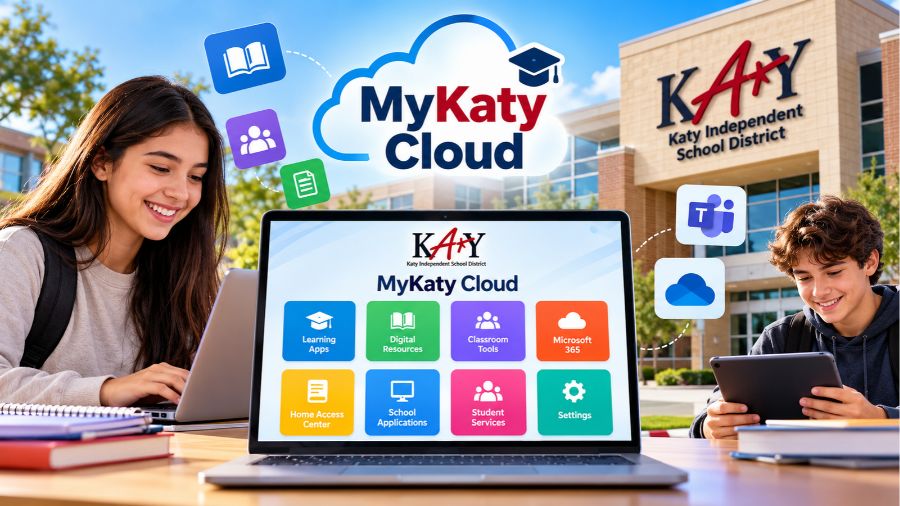
MyKaty Cloud is a digital learning portal designed to help students, teachers, parents, and staff members of Katy Independent School District access educational resources and school-related applications from one convenient place. As technology becomes an increasingly important part of modern education, platforms like MyKaty Cloud make it easier to manage learning activities, explore digital tools, and stay connected with school services. Instead of navigating several websites individually, eligible users can access many supported applications through a centralized dashboard. Whether students need online learning materials, teachers want to organize classroom resources, or parents need to find school-related information, MyKaty Cloud offers a practical starting point. Understanding how the platform works, what features it provides, and how to resolve common login problems can help users make the most of their digital learning experience.
What Is MyKaty Cloud?
MyKaty Cloud is an online portal associated with Katy Independent School District, a public school district in Texas, United States. Its primary purpose is to provide convenient access to digital applications and educational services used throughout the district. The platform brings different learning resources together in one place, reducing the need to remember multiple application addresses or repeatedly search for commonly used school tools.
The portal supports a more organized approach to digital education by allowing authorized users to access applications according to their accounts and permissions. Students may use it to find learning resources, while teachers and other school employees can access tools relevant to their responsibilities. Parents and guardians can also benefit from the district’s digital services, although the applications available to them may differ from those provided to students and staff. MyKaty Cloud is therefore best understood as a central access point rather than a single application designed to perform every educational task.
How Does MyKaty Cloud Work?
MyKaty Cloud works as a centralized dashboard where users can find and open supported educational applications. After signing in with the appropriate school or district credentials, users can view the tools available to their accounts. Depending on their role, these tools may include digital learning platforms, instructional resources, productivity applications, and other school-related services.
One of the main advantages of this arrangement is convenience. Without a centralized portal, users might need to bookmark several websites, remember different login procedures, or spend time searching for the applications they use regularly. MyKaty Cloud helps simplify this process by bringing supported services together within a familiar environment. Some applications may support single sign-on, which allows users to access connected services without entering their credentials again. However, individual applications may still require separate authentication or additional verification.
Key Features of MyKaty Cloud
MyKaty Cloud offers several useful features that support everyday educational activities. Its exact functionality depends on the applications available through the district and the permissions assigned to each account.
Centralized Application Access
The portal’s most important feature is its centralized dashboard. Users can locate supported school applications without having to search for each service independently. This can save time for students who regularly move between learning platforms and teachers who rely on several digital tools throughout the school day.
A central dashboard also helps create a more consistent experience across different devices. Once users become familiar with the portal, they can more easily identify the applications they need. This simple arrangement makes digital resources easier to organize and access.
Single Sign-On Convenience
Single sign-on is an important feature of many modern educational portals. When supported by the district and an individual application, it allows users to authenticate once and access connected services without repeatedly entering their usernames and passwords.
This approach can reduce login frustration and make classroom activities more efficient. However, single sign-on does not necessarily work with every application available through MyKaty Cloud. Some services may request additional credentials, permissions, or verification. Users should always follow the instructions provided by their school or the specific application.
Access to Digital Learning Resources
Online educational resources allow students to review lessons, complete assignments, and explore learning materials outside traditional classroom activities. Through the applications available in MyKaty Cloud, eligible users may find digital textbooks, interactive learning programs, instructional content, and subject-specific resources.
These tools can support different learning styles by combining written explanations, videos, practice activities, and assessments. Students can use suitable resources to reinforce classroom lessons, while teachers can incorporate digital materials into their instructional plans. The available resources vary according to district arrangements and the user’s account.
Support for Teachers and School Staff
Teachers and school employees often depend on multiple applications to prepare lessons, communicate with students, organize materials, and perform administrative tasks. A centralized portal can make these responsibilities easier by providing a common starting point for frequently used services.
Rather than searching for every application separately, staff members can locate supported tools through the dashboard. This can reduce unnecessary interruptions and help educators spend more time on teaching, planning, and supporting students. The specific applications available to employees depend on their roles and district access permissions.
Access Across Compatible Devices
Digital learning frequently takes place on more than one device. Students may use school-issued laptops, desktop computers, tablets, or personal mobile devices, depending on district policies. MyKaty Cloud can provide access through compatible devices and supported browsers, allowing users to reach available resources when their equipment meets the relevant requirements.
The experience may vary depending on screen size, browser compatibility, and the application being opened. Some tools work better on a computer than on a mobile device. For the best experience, users should keep their browsers updated and follow any device requirements established by Katy ISD.
How to Log In to MyKaty Cloud
Logging in to MyKaty Cloud is generally straightforward when users have the correct account credentials. The process involves opening the official district portal, entering the required information, and selecting an available application.
First, open a web browser on a compatible device and navigate to the official MyKaty Cloud portal. Make sure the website belongs to Katy Independent School District before entering any personal information. Next, enter the username and password associated with your district account. Follow any additional authentication instructions that appear on the screen.
After a successful sign-in, the portal should display the applications available to your account. Select the service you need and follow its instructions. If an application requests another login, use the credentials assigned to that service or contact the appropriate school support team if you are unsure which account to use.
Students, employees, and parents should remember that their login procedures may differ. Using another person’s credentials or attempting to access applications without authorization can create security and privacy problems. Always use your own approved account.
Who Can Use MyKaty Cloud?
MyKaty Cloud is primarily intended for members of the Katy Independent School District community. The applications and services available through the portal depend on the user’s relationship with the district and the permissions associated with the account.
Students
Students can use the portal to find supported learning applications and educational resources. These may help them review classroom material, complete digital activities, and access tools assigned by their teachers. Having a centralized location for these resources can make schoolwork easier to organize, especially when several applications are required for different subjects.
Students should use their district-provided credentials and follow school policies when accessing online resources. If an application is missing or unavailable, a teacher or school technology representative may be able to explain whether the student has the appropriate permissions.
Teachers and Employees
Teachers and other authorized employees may use MyKaty Cloud to access instructional, administrative, and productivity tools. These resources can support lesson preparation, classroom activities, and everyday school operations.
Because employee accounts may provide access to sensitive information, staff members should protect their login credentials and avoid leaving authenticated sessions open on shared devices. They should also follow district requirements for handling school records and communicating through approved services.
Parents and Guardians
Parents and guardians may need digital services to review student information, communicate with schools, or manage school-related responsibilities. However, MyKaty Cloud should not automatically be treated as a replacement for every parent-facing system.
For example, Home Access Center is a separate district service used to view eligible student information. Access arrangements and available features depend on the relevant account. Parents should use the login instructions provided by Katy ISD and contact district support if they need help identifying the correct system.
Benefits of Using MyKaty Cloud
One of the biggest benefits of MyKaty Cloud is the time it can save. When frequently used applications are available from a central location, students and employees can spend less time searching for tools and more time completing meaningful tasks. This is particularly useful in schools where digital applications are part of everyday teaching and learning.
Another advantage is improved organization. A centralized dashboard provides a familiar starting point for finding educational resources, reducing confusion when multiple services are involved. The portal can also support continuity between classroom and independent learning by making approved digital tools easier to locate.
MyKaty Cloud may further improve convenience by supporting single sign-on for compatible applications. Fewer repeated login steps can make digital learning less frustrating, although the precise benefits depend on the applications connected to the user’s account.
Most importantly, the platform supports a broader digital learning environment. Technology cannot replace effective teaching, personal guidance, or student effort, but it can make educational resources more accessible. When used appropriately, a portal like MyKaty Cloud can help students, teachers, and families navigate the digital side of school more efficiently.
Common MyKaty Cloud Login Problems and Solutions
Although the portal is designed to simplify access, users may occasionally experience technical problems. Understanding the most common causes can make troubleshooting easier.
Incorrect Username or Password
An incorrect username or password is one of the most common reasons a login attempt fails. Check that your information is entered accurately and that the keyboard’s Caps Lock setting is not causing a problem. If you have forgotten your password, use the district-approved recovery process or contact school technology support.
Avoid repeatedly guessing passwords, particularly if your account may become locked after unsuccessful attempts. Following the official recovery procedure is generally the safest approach.
Portal Not Loading
If the portal does not load, check your internet connection and refresh the page. You can also try opening the website in an updated browser or clearing the browser’s cached data if persistent loading issues occur.
If the problem continues, test another compatible device or network when appropriate. The issue could be related to a temporary service interruption, browser compatibility, or network restrictions. If several users experience the same problem, contacting district support may be more useful than repeatedly changing your personal settings.
Applications Missing From the Dashboard
Not every user has access to the same applications. A missing tool may reflect account permissions, school arrangements, or changes to the district’s available services rather than a technical error.
If an application you previously used is no longer visible, ask your teacher, supervisor, or school technology representative to confirm whether it should be available to your account. Do not attempt to bypass access restrictions.
Problems on Mobile Devices
Some applications may not display correctly on smaller screens or may require a compatible browser. If you experience difficulties on a phone or tablet, update your browser, close unnecessary tabs, and try opening the portal again. If the application has specific device requirements, follow its recommended instructions.
For tasks involving complex assignments, documents, or administrative tools, a laptop or desktop computer may offer a more comfortable experience.
MyKaty Cloud Security and Privacy
Security is an important consideration whenever school applications and personal information are accessed online. Users should protect their credentials, sign in only through trusted district resources, and avoid sharing passwords with friends or other unauthorized individuals.
When using a shared computer, sign out after finishing your work and close the browser if necessary. Avoid saving passwords on public devices, and do not leave sensitive school information visible to other people. Students and parents should also be cautious about messages requesting login details, especially when the sender or website cannot be verified.
Teachers and staff members may have access to confidential educational or administrative information, making careful account management particularly important. Following district security policies helps protect both individual accounts and the wider school community.
Users should also remember that the applications accessible through the portal may have their own privacy settings and data-handling practices. When questions arise about student information, permissions, or data protection, the district’s official policies provide the appropriate guidance.
Tips for Getting the Most Out of MyKaty Cloud
To use MyKaty Cloud efficiently, start by becoming familiar with the applications available on your dashboard. Identify the tools you use most often and learn what each one is designed to do. This can make it easier to move between school activities without unnecessary delays.
Keep your account credentials secure and make sure your recovery information follows the district’s requirements. If you use the portal regularly, keeping your browser updated can help reduce compatibility problems. You should also report recurring technical issues instead of assuming that every error is caused by your device.
Students can benefit from checking teacher instructions before opening an application, particularly when completing assignments or assessments. Teachers can help by explaining which resources students should use and where to find them. Parents should confirm which district systems are intended for their needs rather than assuming that every service is available through the same login.
Finally, remember that MyKaty Cloud is an access tool, not a substitute for academic planning or communication. Its value comes from using the available resources effectively and responsibly.
Conclusion
MyKaty Cloud plays an important role in the digital learning environment of Katy Independent School District by bringing supported educational applications and school resources together in one convenient portal. Its centralized dashboard, potential single sign-on capabilities, and access to digital learning tools can help students, teachers, and other authorized users manage school-related activities more efficiently. Understanding the login process, account permissions, security practices, and common troubleshooting steps makes the platform easier to use. Although individual features vary according to the user’s role and available services, the overall purpose remains simple: to make digital educational resources more accessible and organized. By using the portal responsibly, keeping account information secure, and seeking official support when problems arise, members of the Katy ISD community can make better use of the technology available to support teaching, learning, and school communication.
FAQs About MyKaty Cloud
Is MyKaty Cloud Free to Use?
MyKaty Cloud is a district-provided portal for eligible Katy ISD users. Access to the portal is associated with the user’s school or district account. Some individual applications may have their own eligibility requirements, but users should follow the district’s guidance regarding available services.
Can I Access MyKaty Cloud From Home?
Eligible users can generally access supported online services from home using a compatible device and internet connection. Access may depend on account permissions, application requirements, and any district restrictions. Users should follow the approved login process when accessing school resources outside the classroom.
Is MyKaty Cloud the Same as Home Access Center?
No. MyKaty Cloud is a centralized portal for supported applications, while Home Access Center is a separate service used by eligible parents and guardians to review student information. Although the services may be connected through the district’s digital environment, they have different purposes.
What Should I Do If I Forget My Login Details?
Use the district-approved account recovery process or contact the appropriate school technology support team. Students should ask their teacher or school staff for guidance if they cannot recover their credentials independently. Avoid sharing passwords or using unofficial recovery services.
Can Anyone Create a MyKaty Cloud Account?
The portal is intended for authorized members of the Katy ISD community rather than the general public. Account eligibility and available applications depend on the user’s relationship with the district and the permissions assigned to their account.
Also read: Lash Tech